How To Add Fund In Ceofame Wallet
How To Add Fund In Ceofame Wallet
Before placing any order on Ceofame, your account must have sufficient balance available in the wallet. The wallet system is designed to make transactions quick and convenient so users can launch marketing campaigns without waiting for manual confirmations each time. Once funds are added, they can be used instantly to purchase any service available on the platform.
Adding funds to your Ceofame wallet is a simple process that allows businesses, marketers, and resellers to manage their spending efficiently while maintaining full control over campaign budgets.
Accessing the Add Funds Section
After logging into your Ceofame account, navigate to the dashboard and locate the “Add Funds” or “Deposit” option. This section allows you to recharge your wallet using the available payment methods supported by the platform.
The interface is structured so users can easily select the amount they want to add without navigating through complicated steps.
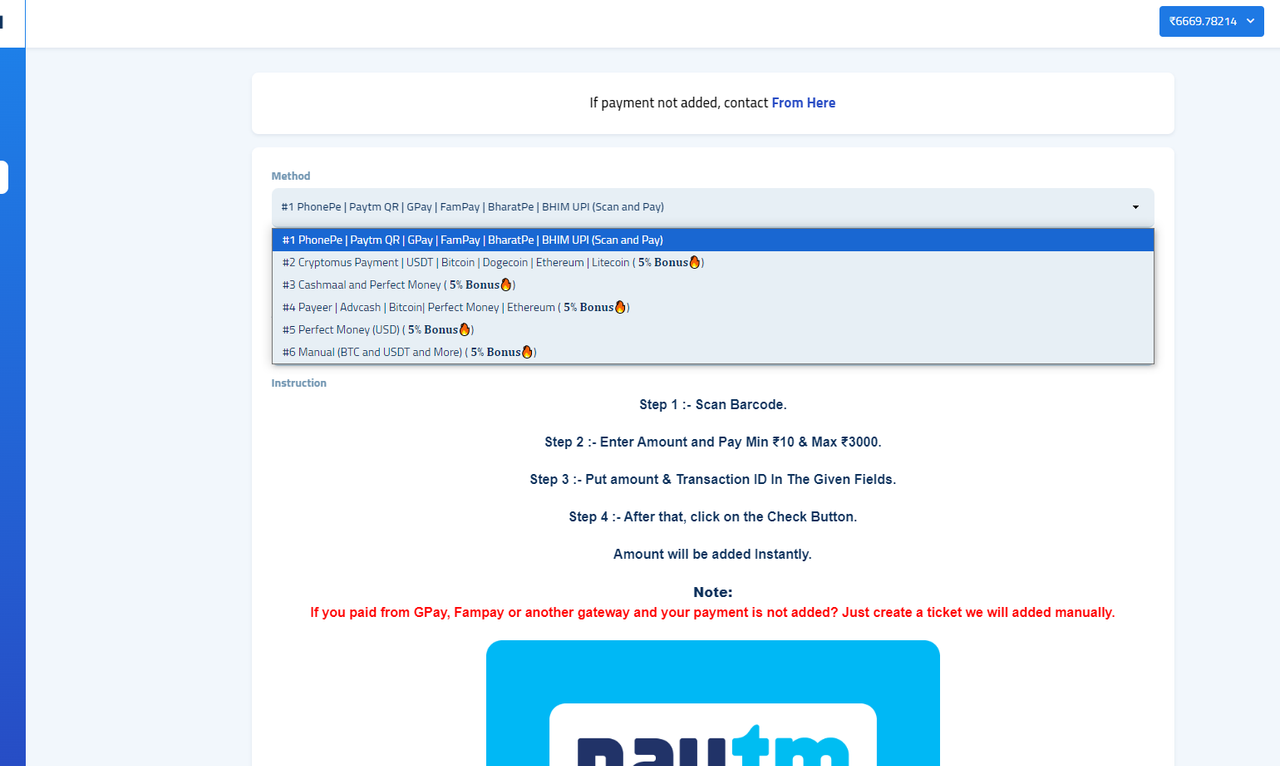
Selecting the Payment Method
Ceofame provides secure payment channels to ensure smooth and reliable transactions. Users can choose the method that best suits their requirements and proceed with the payment request.
Once the payment option is selected, the system will guide you through the transaction process to complete the recharge securely.
Entering the Deposit Amount
Specify the amount you want to add to your wallet based on your marketing needs. Many users prefer maintaining a balance so they can place multiple orders without repeating the payment process.
This flexibility is especially useful for agencies and resellers who manage ongoing campaigns or handle services for multiple clients.
Completing the Transaction
After confirming the payment, the system processes your request and updates the wallet balance. Once the balance is reflected in your account, you are ready to place orders across any available service category.
All transactions are recorded in your account history, allowing you to track deposits and maintain transparency in spending.
Using Your Wallet Balance for Services
With funds available in your wallet, you can immediately start ordering services such as followers, likes, views, or engagement packages. The wallet eliminates the need for repeated payments, helping users operate more efficiently when managing campaigns.
This approach simplifies budgeting and ensures that services can be activated whenever needed without delays.
Managing Your Marketing Budget Efficiently
The Ceofame wallet system is not just for payments; it also acts as a financial management tool. Users can plan spending, monitor service usage, and control campaign investments from a centralized location.
By maintaining a ready balance, businesses can respond quickly to marketing opportunities, launch promotions on time, and keep their digital strategies running smoothly.
```0